Tuesday, 30 December 2025

Why Oracle Performs Full Table Scan for DISTINCT Queries

This question was recently asked by a colleague:

"I have an index on a column, but when I run a DISTINCT query on that column, Oracle still performs a full table scan. Why?”
At first glance, this feels counter-intuitive. If an index exists, Oracle should use it, right?
The answer is simple, but understanding why Oracle behaves this way is important for every DBA.
In this post, we’ll walk through a small test case and see exactly when and why Oracle uses (or ignores) an index for a DISTINCT query.

Test Setup

Let’s create a sample table with some data and an index on the column we’ll use in the DISTINCT query.
 

SQL>  create table some_data as select trunc(dbms_random.value(1,100)) val, a.* from dba_objects a;
Table created.
SQL> @desc some_data
 Name                                      Null?    Type
 ----------------------------------------- -------- ----------------------------
 VAL                                                NUMBER
 OWNER                                              VARCHAR2(128)
 OBJECT_NAME                                        VARCHAR2(128)
 SUBOBJECT_NAME                                     VARCHAR2(128)
 OBJECT_ID                                          NUMBER
 DATA_OBJECT_ID                                     NUMBER
 OBJECT_TYPE                                        VARCHAR2(23)
 CREATED                                            DATE
 LAST_DDL_TIME                                      DATE
 TIMESTAMP                                          VARCHAR2(19)
 STATUS                                             VARCHAR2(7)
 TEMPORARY                                          VARCHAR2(1)
 GENERATED                                          VARCHAR2(1)
 SECONDARY                                          VARCHAR2(1)
 NAMESPACE                                          NUMBER
 EDITION_NAME                                       VARCHAR2(128)
 SHARING                                            VARCHAR2(18)
 EDITIONABLE                                        VARCHAR2(1)
 ORACLE_MAINTAINED                                  VARCHAR2(1)
 APPLICATION                                        VARCHAR2(1)
 DEFAULT_COLLATION                                  VARCHAR2(100)
 DUPLICATED                                         VARCHAR2(1)
 SHARDED                                            VARCHAR2(1)
 CREATED_APPID                                      NUMBER
 CREATED_VSNID                                      NUMBER
 MODIFIED_APPID                                     NUMBER
 MODIFIED_VSNID                                     NUMBER

SQL> create index some_data_val_indx on some_data(val);
Index created.


SQL>
SQL>
SQL>  exec dbms_stats.gather_table_stats(null, 'SOME_DATA', cascade=>true);
PL/SQL procedure successfully completed.

SQL> set autot trace
SQL>  select distinct val from some_data;
99 rows selected.

Execution Plan
----------------------------------------------------------
Plan hash value: 443606636

-------------------------------------------------------------
| Id  | Operation          | Name      | Rows  | Bytes | Cost (%CPU)| Time     |
--------------------------------------------------------------------------------
|   0 | SELECT STATEMENT   |           |    99 |   297 |   632   (1)| 00:00:01 |
|   1 |  HASH UNIQUE       |           |    99 |   297 |   632   (1)| 00:00:01 |
|   2 |   TABLE ACCESS FULL| SOME_DATA |   116K|   341K|   628   (1)| 00:00:01 |
-------------------------------------------------------------
Statistics
----------------------------------------------------------
         36  recursive calls
          0  db block gets
       2340  consistent gets
          0  physical reads
          0  redo size
       2207  bytes sent via SQL*Net to client
        463  bytes received via SQL*Net from client
          8  SQL*Net roundtrips to/from client
          4  sorts (memory)
          0  sorts (disk)
         99  rows processed


Even though an index exists on VAL, Oracle chooses a full table scan.

What If We Force the Index Using a Hint?

SQL> select /*+ index(some_data) */ distinct val from some_data;
99 rows selected.

Execution Plan
----------------------------------------------------------
Plan hash value: 443606636
-------------------------------------------------------------
| Id  | Operation          | Name      | Rows  | Bytes | Cost (%CPU)| Time     |
--------------------------------------------------------------------------------
|   0 | SELECT STATEMENT   |           |    99 |   297 |   632   (1)| 00:00:01 |
|   1 |  HASH UNIQUE       |           |    99 |   297 |   632   (1)| 00:00:01 |
|   2 |   TABLE ACCESS FULL| SOME_DATA |   116K|   341K|   628   (1)| 00:00:01 |
-------------------------------------------------------------
Hint Report (identified by operation id / Query Block Name / Object Alias):
Total hints for statement: 1 (U - Unused (1))
-------------------------------------------------------------

   2 -  SEL$1 / SOME_DATA@SEL$1
         U -  index(some_data)

Statistics
----------------------------------------------------------
          1  recursive calls
          0  db block gets
       2312  consistent gets
          0  physical reads
          0  redo size
       2207  bytes sent via SQL*Net to client
        486  bytes received via SQL*Net from client
          8  SQL*Net roundtrips to/from client
          0  sorts (memory)
          0  sorts (disk)
         99  rows processed


Result
• Same execution plan
• Index hint is ignored
• Full table scan is still chosen

Oracle clearly doesn’t want to use the index here.

Why Is Oracle Ignoring the Index?

The reason is straightforward:
A B-Tree index does NOT store NULL values.
Since VAL is nullable, Oracle cannot guarantee that all distinct values can be derived by scanning only the index. To be 100% correct, it must scan the table to account for possible NULLs.
That’s why:
• Full table scan is chosen
• Index hints are ignored

What If the Column Is NOT NULL?

Let’s change the column definition.

SQL>  alter table some_data modify(val not null);
Table altered.


SQL>  select distinct val from some_data;

99 rows selected.
Execution Plan
----------------------------------------------------------
Plan hash value: 1329759908
--------------------------------------------------------------------------------------------
| Id  | Operation             | Name               | Rows  | Bytes | Cost (%CPU)| Time     |
-------------------------------------------------------------
|   0 | SELECT STATEMENT      |                    |    99 |   297 |    69   (8)| 00:00:01 |
|   1 |  HASH UNIQUE          |                    |    99 |   297 |    69   (8)| 00:00:01 |
|   2 |   INDEX FAST FULL SCAN| SOME_DATA_VAL_INDX |   116K|   341K|    65   (2)| 00:00:01 |
-------------------------------------------------------------
Statistics
----------------------------------------------------------
          0  recursive calls
          0  db block gets
        236  consistent gets
          0  physical reads
          0  redo size
       2207  bytes sent via SQL*Net to client
        463  bytes received via SQL*Net from client
          8  SQL*Net roundtrips to/from client
          0  sorts (memory)
          0  sorts (disk)
         99  rows processed


Oracle now uses an INDEX FAST FULL SCAN, resulting in:
• Lower cost
• Fewer consistent gets
• Multiblock reads
• No table access

This is a significant improvement.

What If the Column Cannot Be Changed to NOT NULL?

In real systems, modifying column definitions is not always possible.
In that case, we can help Oracle by explicitly excluding NULLs.

SQL> alter table some_data modify (val null);
Table altered.

SQL> select /*+ index_ffs(some_data) */ distinct val from some_data where val is not null;

99 rows selected.

Execution Plan
----------------------------------------------------------
Plan hash value: 1329759908
-------------------------------------------------------------
| Id  | Operation             | Name               | Rows  | Bytes | Cost (%CPU)| Time     |
--------------------------------------------------------------------------------------------
|   0 | SELECT STATEMENT      |                    |    99 |   297 |    69   (8)| 00:00:01 |
|   1 |  HASH UNIQUE          |                    |    99 |   297 |    69   (8)| 00:00:01 |
|*  2 |   INDEX FAST FULL SCAN| SOME_DATA_VAL_INDX |   116K|   341K|    65   (2)| 00:00:01 |
-------------------------------------------------------------
Predicate Information (identified by operation id):
---------------------------------------------------

   2 - filter("VAL" IS NOT NULL)

Statistics
----------------------------------------------------------
          1  recursive calls
          0  db block gets
        236  consistent gets
          0  physical reads
          0  redo size
       2207  bytes sent via SQL*Net to client
        512  bytes received via SQL*Net from client
          8  SQL*Net roundtrips to/from client
          0  sorts (memory)
          0  sorts (disk)
         99  rows processed


Oracle now safely uses the index because:
• NULL values are explicitly filtered
• Index contains all required rows

Key Takeaways
1. B-Tree indexes do not store NULL values
2. DISTINCT on a nullable column often results in a full table scan
3. Oracle may ignore index hints if correctness cannot be guaranteed
4. DISTINCT on a NOT NULL column can use an index efficiently
5. Adding WHERE column IS NOT NULL can enable index usage
6. INDEX FAST FULL SCAN is especially efficient when the index covers all required columns


I hope this article helped you. Your suggestions/feedback are most welcome.

Keep learning... Have a great day!!!


Thank you,
Amit Pawar
Email: amitpawar.dba@gmail.com
WhatsApp No: +91-8454841011


Sunday, 27 April 2025

How to move a datafile that was added by mistake on local storage to shared location


In Real Application Cluster (RAC) environments, data files need to be on shared storage. It is possible that a data file gets added to a tablespace on the local filesystem instead of the shared storage subsystem by mistake. 

When another instance tries to contact the local file it will error out with:

ORA-01157: cannot identify/lock data file 17 - see DBWR trace file
ORA-01110: data file 17: '/home/oracle/test01.dbf'

Typically, this happens when the data file needs to be added to ASM but the '+'-sign is omitted when specifying the disk group. In this case, the data file will be created in the default directory specified by the 'db_create_file_dest' parameter, which defaults to $ORACLE_HOME/DBS.
In the scenario below, it was created by mistake on a different local storage.

This post explains how you can resolve this issue when the database is in archivelog mode and when the database is running in noarchivelog mode.

Note: 

Starting in 12c the process can be simplified using the new "online move" feature.

You need to have all the archive files since the creation of the datafile (when it was added to the tablespace)

1.  Find out the exact file name, file location, size and file number: 

SQL> select file_id, file_name, bytes, online_status from dba_data_files where tablespace_name = '<tablespace_name>';
FILE_ID FILE_NAME                          BYTES     ONLINE_
---------- ---------------------------------------- ---------- -------
16 +DATA/RAC/DATAFILE/test.309.1199529051  104857600 ONLINE
17 /home/oracle/test01.dbf                 104857600 ONLINE <<----


2. Put the datafile offline

SQL> alter database datafile 17 offline;
Database altered.


3. Recreate the datafile on the shared storage, please note that you need to do this on the node where the physical file resides and you need to specify the size retrieved in step 1

SQL> alter database create datafile '/home/oracle/test01.dbf' as '+DATA' size 100M;
Database altered.


4. Check the datafile status on second node.It will show RECOVER

SQL> select file_id, file_name, bytes, online_status from dba_data_files where tablespace_name ='TEST';
   FILE_ID FILE_NAME                                     BYTES ONLINE_
---------- ---------------------------------------- ---------- ------
        16 +DATA/RAC/DATAFILE/test.309.1199529051    104857600 ONLINE
        17 +DATA/RAC/DATAFILE/test.276.1199530103              RECOVER


5. Now Recover the datafile

SQL> recover datafile 17;
Media recovery complete.


6. Place the datafile back online

SQL>alter database datafile 17 online;
Database altered.


7. Verify the datafile status

 select file_id, file_name, bytes, online_status from dba_data_files where tablespace_name ='TEST';

   FILE_ID FILE_NAME                                     BYTES ONLINE_

---------- ---------------------------------------- ---------- ------

        16 +DATA/RAC/DATAFILE/test.309.1199529051    104857600 ONLINE

        17 +DATA/RAC/DATAFILE/test.276.1199530103    104857600 ONLINE


I hope this article helped you. Your suggestions/feedback are most welcome.

Keep learning... Have a great day!!!


Thank you,
Amit Pawar
Email: amitpawar.dba@gmail.com
WhatsApp No: +91-8454841011

Sunday, 29 September 2024

Patching a DB System in OCI


Let's learn how to patch an Oracle Database 19c - 19.23 to 19.24 using the OCI DB System.

1. Validate the current version :

Login to the OCI Cloud Console

Navigate under Oracle Database --> Database (BM/VM) - BM - Bare Metal / VM - Virtual Machine


Now navigate to the DB System in question click on the Node and login to the box to validate the current version: 19.23.0.0.0

You can do the same check using the Database Command Line(CLI)


2. Check the latest version available.

Now navigate to the console:

Click on the DB Systems section --> At the bottom left of the screen click on

Databases

Click on Databases

Now navigate to the Database Page.

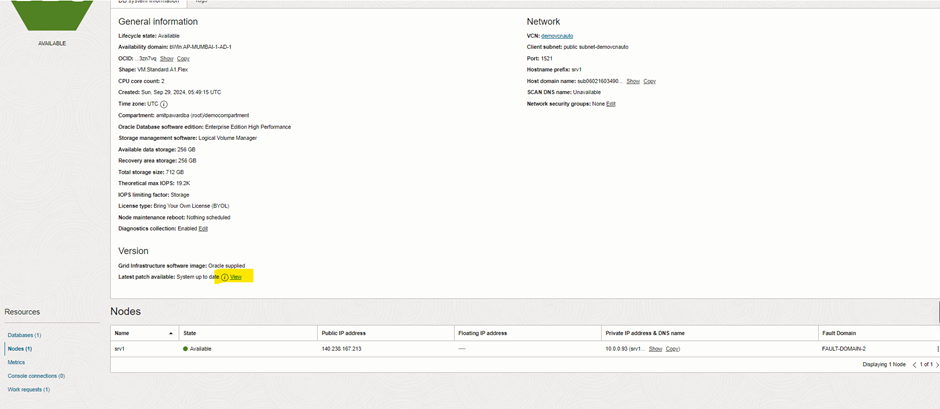
Scroll down to the section where it is says Version:

Click on the View hyperlink to view the latest version:

Click View latest Version Parch

As you can see below, the latest is 19.24. Let's Patch this database.

Latest 19.24 version

Note : Patching database required downtime, so perform this activity during maintenance window.

3. Run precheck


Once precheck is completed, now apply the actual patch.

4. Apply Database Patch

Navigate to the Database and the hamburger menu and click on Apply

Note with Apply, it does a pre-check and then applies the patch

You will now see the status change from Available to Applying

Applying the Patch 19.24.0.0.0

You can monitor the status using CLI using the below command.

[root@srv1 ~]# dbcli list-jobs

[root@srv1 ~]# dbcli describe-job -i a276b6a6-af06-4baa-ac9d-dd45c55f9ae7

Now the database patch has completed successfully.


4. Verify the database Patch

Let's verify the same using database command line(CLI)

Successful Patch 19.24.0.0.0

Congratulation..!! We have successfully patched an OCI bound DB system!


I hope this article helped you. Your suggestions/feedback are most welcome.

Keep learning... Have a great day!!!


Thank you,
Amit Pawar
Email: amitpawar.dba@gmail.com
WhatsApp No: +91-8454841011

Saturday, 14 September 2024

Oracle Exadata Smart Flash Cache

Exadata Smart Flash Cache, part of the cell (storage) server, temporarily holds redo data before it is securely written to disk. Exadata Storage Servers feature extensive flash storage, with a portion reserved for database logging and the rest utilized for caching user data.

On a full rack Exadata server, there is approximately 5 TB of flash cache available, offering considerable storage capacity for caching.

The Exadata Database Machine’s exceptional performance is largely due to two key features in the Exadata Storage Server Software, which optimize the flash hardware:

  1. Exadata Smart Flash Cache – enables the staging of active database objects in flash.
  2. Exadata Smart Flash Logging – accelerates database logging tasks.

These features, combined with Exadata’s mission-critical resilience, make it an ideal platform for Oracle Database deployment. Flash cache management is automatic, but users can influence caching priorities through hints, and administrators have the ability to disable it for specific databases.

Intelligent Caching: 

The Smart Flash Cache recognizes different database I/O patterns, prioritizing frequently accessed data and index blocks for caching. Control file and file header operations are also cached, and database administrators can adjust caching priorities to suit workload demands.

However, monitoring the cache contents is not straightforward. Oracle provides the list flashcachecontent command via the cellcli tool, but it lacks summary options and only displays object numbers.

 Example- 

CellCLI> list flashcachecontent where objectNumber = 43215 detail;
        cachedKeepSize:         0
        cachedSize:             42384
         dbID:                   191919191
        dbUniqueName:           TEST
         hitCount:               18
         missCount:              1
         objectNumber:           43215
         tableSpaceNumber:       8

Data that is Never Cached in Flash Cache:

Backup related I/O is not cached
Data pump I/O is not cached
Datafile formating data is not cached
Table scans do not monopolize the cache
I/Os to mirror copies are managed intelligently. 

FlashDisk-based Grid Disks:

To speed up I/O performance for random reads, Exadata V2 introduced solid state storage called Flash Cache.

•Flash cache is configured as a cell disk of type FlashDisk, and just as grid disks are created on HardDisk cell disks, they may also be created on FlashDisk cell disks.

•FlashDisk type cell disks are named with a prefix of FD and a diskType of FlashDisk. 

 Creating FlashDisk based Grid Disks:

 It is not recommended to use all of your Flash Cache for grid disks. When creating the Flash Cache, use the size parameter to hold back some space to be used for grid disks.

 CellCLI> create flashcache all size=300g;

 •We can create grid disks using the remaining free space on the Flash Disks, using the familiar 'create griddisk' command.

 CellCLI> create griddisk all flashdisk prefix='RAMDISK‘;

CellCLI> list griddisk attributes name, diskType, size – where disktype='FlashDisk‘;

 The beauty of Flash Cache configuration is that all this may be done while the system is online and servicing I/O requests.

Data Processing modes of Flash Cache:

 1. Write through mode -  Excellent for absorbing repeated random reads.

2. Write-back mode - Best for write intensive workloads commonly found in OLTP applications

 By default, Exadata flash cache Operates in write-through mode. DBA’s can influence caching priorities by using CELL_FLASH_CACHE storage attribute for specific database objects.

 1. Write Through mode 

 Please read the data points and understand write and read operations in exadata server using write through mode.


In write-through mode, smart cache work as follows

 - For Write Operations, CELLSRV writes data to disk and sends acknowledgment to the DB so it can continue without interruption. Then, if the data is suitable for caching, it is written to smart flash cache. Write performance is not improved or diminished using this method. However, if a subsequent read operation needs the same data , it is likely to benefit from the cache. When data  is inserted into a full cache, a prioritized least recently used (LRU) algorithm.  

 - For Read Operations (on cached data), CELLSRV must first determine if the request should use the cache.This decisions is based on various factors including the reason for the read, the CELL_FLASH_CACHE setting for the associated object, and the current load on the cell. If it is determined that the cache should be used , CELLSRV uses an in-memory hash table, to quickly determine if the data resides in flash cache. If the request data is cached , a cache lookup is used to satisfy the  I/O request.

 - For Read Operations (On un-cached data) that cannot be satisfied using flash cache, a disk read is performed and the requested information is sent to the database. Then if the data is suitable for caching , it is written to the flash cache.

 2. Write Back mode


In this mode, write Operations work as follows

 - CELLSRV receives the write operation and uses intelligent caching algorithms to determine if the data is suitable for caching. 

- If the data is suitable for caching, it is written to flash cache only. If the cache is full, CELLSRV determines which data to replace using the same prioritized least recently used (LRU) algorithm as in write through mode.

- After the data is written to flash, an acknowledgement is sent back to the database.

- Data is only written back to disk when it is aged out of the cache. 

 Note the following regarding write back flash cache

- Write back flash cache allows 20 times more write I/Os per second on X3-4 systems, which makes it ideal for write intensive applications that would otherwise saturate the disk controller write cache. 

- The large flash capacity on X5 systems means that for many applications a very high proportion of all I/O can be serviced by flash.

- An active data block can remain in write back flash cache for months or years. Also, flash cache is persistence through power outages, shutdown operations, cell restarts and so on.

- With write back flash cache, data redundancy is maintained by writing primary and secondary data copies to cache on separate cell(storage) servers.   

- Secondary block copies are aged out of the cache and written to disk more quickly than primary copies. Hence, blocks that have not been read recently only keep the primary copy in cache, which optimizes the utilization of the premium flash cache.

- If there is a problem with the flash cache on one storage server, then operations transparently fail over to the mirrored copies (on flash or disk) on other storage servers. No user intervention is required. The unit for mirroring is the ASM allocation unit. This means that the amount of data affected is proportional to the lost cache size, not the disk size.

- With write back flash cache, read operations are handled the same as a write trough flash cache.  

LIST CELL shows the current value.

CELLCLI> list cell attributes flashcachemode

CELLCLI> list cell detail

How to enable Write-Back Flash Cache:

Methods are available:

1. Rolling Method - Assuming that RDBMS & ASM instances are UP and enabling Write-Back Flash Cache in One Cell Server at a time

2. Non-Rolling Method - Assuming that RDBMS & ASM instances are DOWN while enabling Write-Back Flash Cache

Note: Before performing the below steps, Perform the following check as root from one of the compute nodes:

Check all griddisk “asmdeactivationoutcome” and “asmmodestatus” to ensure that all griddisks on all cells are “Yes” and “ONLINE” respectively.

# dcli -g cell_group -l root cellcli -e list griddisk attributes asmdeactivationoutcome, asmmodestatus

Check that all of the flashcache are in the “normal” state and that no flash disks are in a degraded or critical state:

# dcli -g cell_group -l root cellcli -e list flashcache detail

exadata01cell01: WriteThrough
exadata01cell02: WriteThrough
exadata01cell03: WriteThrough

1.     Rolling Method:

(Assuming that RDBMS & ASM instances are UP and enabling Write-Back Flash Cache in One Cell Server at a time)

Login to Cell Server:

Step 1. Drop the flash cache on that cell

#cellcli –e drop flashcache

Flash cache exadata01cell01_FLASHCACHE successfully dropped

Step 2. Check the status of ASM if the grid disks go OFFLINE. The following command should return 'Yes' for the grid disks being listed:

 # cellcli -e list griddisk attributes name,asmmodestatus,asmdeactivationoutcome

         DATAC1_CD_00_exadata01cell01   OFFLINE  Yes
         DATAC1_CD_01_exadata01cell01   OFFLINE  Yes
         DATAC1_CD_02_exadata01cell01   OFFLINE  Yes
         DATAC1_CD_03_exadata01cell01   OFFLINE  Yes
         DATAC1_CD_04_exadata01cell01   OFFLINE  Yes
         DATAC1_CD_05_exadata01cell01   OFFLINE  Yes
         DBFS_DG_CD_02_exadata01cell01  OFFLINE  Yes
         DBFS_DG_CD_03_exadata01cell01  OFFLINE  Yes
         DBFS_DG_CD_04_exadata01cell01  OFFLINE  Yes
         DBFS_DG_CD_05_exadata01cell01  OFFLINE  Yes
         RECOC1_CD_00_exadata01cell01   OFFLINE  Yes
         RECOC1_CD_01_exadata01cell01   OFFLINE  Yes
         RECOC1_CD_02_exadata01cell01   OFFLINE  Yes
         RECOC1_CD_03_exadata01cell01   OFFLINE  Yes
         RECOC1_CD_04_exadata01cell01   OFFLINE  Yes
         RECOC1_CD_05_exadata01cell01   OFFLINE  Yes

Step 3. Inactivate the griddisk on the cell

# cellcli –e alter griddisk all inactive

 Step 4. Shut down cellsrv service

# cellcli -e alter cell shutdown services cellsrv 

 Stopping CELLSRV services...

The SHUTDOWN of CELLSRV services was successful.

Step 5. Set the cell flashcache mode to writeback 

# cellcli -e "alter cell flashCacheMode=writeback"

 Cell exadata01cell01 successfully altered

 Step 6. Restart the cellsrv service 

# cellcli -e alter cell startup services cellsrv 

Starting CELLSRV services...

The STARTUP of CELLSRV services was successful.

Step 7. Reactivate the griddisks on the cell

# cellcli –e alter griddisk all active
GridDisk DATAC1_CD_00_exadata01cell03 successfully altered
GridDisk DATAC1_CD_01_exadata01cell03 successfully altered
GridDisk DATAC1_CD_02_exadata01cell03 successfully altered
GridDisk DATAC1_CD_03_exadata01cell03 successfully altered
GridDisk DATAC1_CD_04_exadata01cell03 successfully altered
GridDisk DATAC1_CD_05_exadata01cell03 successfully altered
GridDisk DBFS_DG_CD_02_exadata01cell03 successfully altered
GridDisk DBFS_DG_CD_03_exadata01cell03 successfully altered
GridDisk DBFS_DG_CD_04_exadata01cell03 successfully altered
GridDisk DBFS_DG_CD_05_exadata01cell03 successfully altered
GridDisk RECOC1_CD_00_exadata01cell03 successfully altered
GridDisk RECOC1_CD_01_exadata01cell03 successfully altered
GridDisk RECOC1_CD_02_exadata01cell03 successfully altered
GridDisk RECOC1_CD_03_exadata01cell03 successfully altered
GridDisk RECOC1_CD_04_exadata01cell03 successfully altered
GridDisk RECOC1_CD_05_exadata01cell03 successfully altered

Step 8. Verify all grid disks have been successfully put online using the following command:

# cellcli -e list griddisk attributes name, asmmodestatus
         DATAC1_CD_00_exadata01cell02   ONLINE         Yes
         DATAC1_CD_01_exadata01cell02   ONLINE         Yes
         DATAC1_CD_02_exadata01cell02   ONLINE         Yes
         DATAC1_CD_03_exadata01cell02   ONLINE         Yes
         DATAC1_CD_04_exadata01cell02   ONLINE         Yes
         DATAC1_CD_05_exadata01cell02   ONLINE         Yes
         DBFS_DG_CD_02_exadata01cell02  ONLINE         Yes
         DBFS_DG_CD_03_exadata01cell02  ONLINE         Yes
         DBFS_DG_CD_04_exadata01cell02  ONLINE         Yes
         DBFS_DG_CD_05_exadata01cell02  ONLINE         Yes
         RECOC1_CD_00_exadata01cell02   ONLINE         Yes
         RECOC1_CD_01_exadata01cell02   ONLINE         Yes
         RECOC1_CD_02_exadata01cell02   ONLINE         Yes
         RECOC1_CD_03_exadata01cell02   ONLINE         Yes
         RECOC1_CD_04_exadata01cell02   ONLINE         Yes
         RECOC1_CD_05_exadata01cell02   ONLINE         Yes

Step 9. Recreate the flash cache 

# cellcli -e create flashcache all
Flash cache exadata01cell01_FLASHCACHE successfully created

If the flash disk is used for flash cache, then the effective cache size increases. If the flash disk is used for grid disks, then the grid disks are re-created on the new flash disk. If those gird disks were part of an Oracle ASM disk group, then they are added back to the disk group, and the data is rebalanced on them based on the disk group redundancy and ASM_POWER_LIMIT parameter.

Step 10. Check the status of the cell to confirm that it's now in WriteBack mode:

# cellcli -e list cell detail | grep flashCacheMode 
flashCacheMode:         WriteBack                            
 

Step 11. Repeat these same steps again on the next cell to the FINAL cell. However, before taking another storage server offline, execute the following making sure 'asmdeactivationoutcome' displays YES:

 # cellcli -e list griddisk attributes name,asmmodestatus, asmdeactivationoutcome
         DATAC1_CD_00_exadata01cell01   ONLINE  Yes
         DATAC1_CD_01_exadata01cell01   ONLINE  Yes
         DATAC1_CD_02_exadata01cell01   ONLINE  Yes
         DATAC1_CD_03_exadata01cell01   ONLINE  Yes
         DATAC1_CD_04_exadata01cell01   ONLINE  Yes
         DATAC1_CD_05_exadata01cell01   ONLINE  Yes
         DBFS_DG_CD_02_exadata01cell01  ONLINE  Yes
         DBFS_DG_CD_03_exadata01cell01  ONLINE  Yes
         DBFS_DG_CD_04_exadata01cell01  ONLINE  Yes
         DBFS_DG_CD_05_exadata01cell01  ONLINE  Yes
         RECOC1_CD_00_exadata01cell01   ONLINE  Yes
         RECOC1_CD_01_exadata01cell01   ONLINE  Yes
         RECOC1_CD_02_exadata01cell01   ONLINE  Yes
         RECOC1_CD_03_exadata01cell01   ONLINE  Yes
         RECOC1_CD_04_exadata01cell01   ONLINE  Yes
         RECOC1_CD_05_exadata01cell01   ONLINE  Yes

After changing the flashcache modes on all cells, check if flashcache modes are changed to write-back for all cells.

CellCLI> dcli -g ~/cell_group -l root cellcli -e "list cell attributes flashcachemode"
exadata01cell01: WriteBack
exadata01cell02: WriteBack
exadata01cell03: WriteBack

  2.     Non-Rolling Method:

 (Assuming that RDBMS & ASM instances are DOWN while enabling Write-Back Flash Cache)

Step 1. Drop the flash cache on that cell

# cellcli -e drop flashcache 

 Step 2. Shut down cellsrv service

 # cellcli -e alter cell shutdown services cellsrv 

 Step 3. Set the cell flashcache mode to writeback 

 # cellcli -e "alter cell flashCacheMode=writeback" 

 Step 4. Restart the cellsrv service 

 # cellcli -e alter cell startup services cellsrv 

 Step 5. Recreate the flash cache 

 # cellcli -e create flashcache all

 Write-Back Flash Cache Not Required for DiskGroup:

Note: We can disable Write-Back Flash Cache diskgroups like RECO not requiring this feature. This can save space in the flash cache.

CACHINGPOLICY could be used to change the flash cache policy of the griddisk.

Before changing the cache policy from default to none, ensure there is no cached data in flash cache for the grid disk:

CellCLI> create griddisk all harddisk prefix=RECO, size=1006, cachingPolicy="none“;

 OR

CELLCLI>ALTER GRIDDISK grid_disk_name FLUSH;

CELLCLI>ALTER GRIDDISK grid_disk_name CACHINGPOLICY="none";

 Flushing the data from Flash Cache to Disk – Manual Method:

The data which is not been synchronized with griddisk can be synchronized using the FLUSH option.

CELLCLI>ALTER GRIDDISK grid_disk_name FLUSH

 Use the following command to check the progress of this activity:

 CELLCLI>LIST GRIDDISK ATTRIBUTES name, flushstatus, flusherr

 Reinstating WriteThrough FlashCache:

1.   To reinstate Writethrough caching, FlashCache must first be flushed

2.   FlashCache must then be dropped and cellsrv stopped.

Step 1. CELLCLI> alter flashcache all flush

Step 2. CELLCLI> drop flashcache

Step 3. CELLCLI> alter cell shutdown services cellsrv

Step 4. CELLCLI> alter cell flashCacheMode = WriteThrough

Step 5. CELLCLI> alter cell startup services cellsrv

Monitoring Flash Cache Usage:

CELLCLI> list metricdefinition attributes name, description where name like '.*_DIRTY‘ 

CD_BY_FC_DIRTY

Number of unflushed bytes cached in FLASHCACHE on a cell disk

FC_BY_DIRTY

Number of unflushed bytes in FlashCache

FC_BY_STALE_DIRTY

Number of unflushed bytes in FlashCache which cannot be flushed. Because cached disks are not accessible

GD_BY_FC_DIRTY         

Number of unflushed bytes cached in FLASHCACHE for a grid disk

 SUMMARY

Use the Write-Back Flash Cache feature to leverage the Exadata Flash hardware and make Exadata Database Machine a faster system for Oracle Database Deployments.  Flash Storage inside the Oracle Exadata Database Machine is used completely as Flash Cache by default, effectively working as an extension of the Database Buffer Cache  and delivering faster Access together with a very high IO per Second rate which is especially important for OLTP. Additionally, we may take a part of the Flash Storage to build ASM diskgroups upon it. Files placed on these diskgroups will reside permanently on Flash Storage – no Caching needed.